Last updated: 24 October 2026
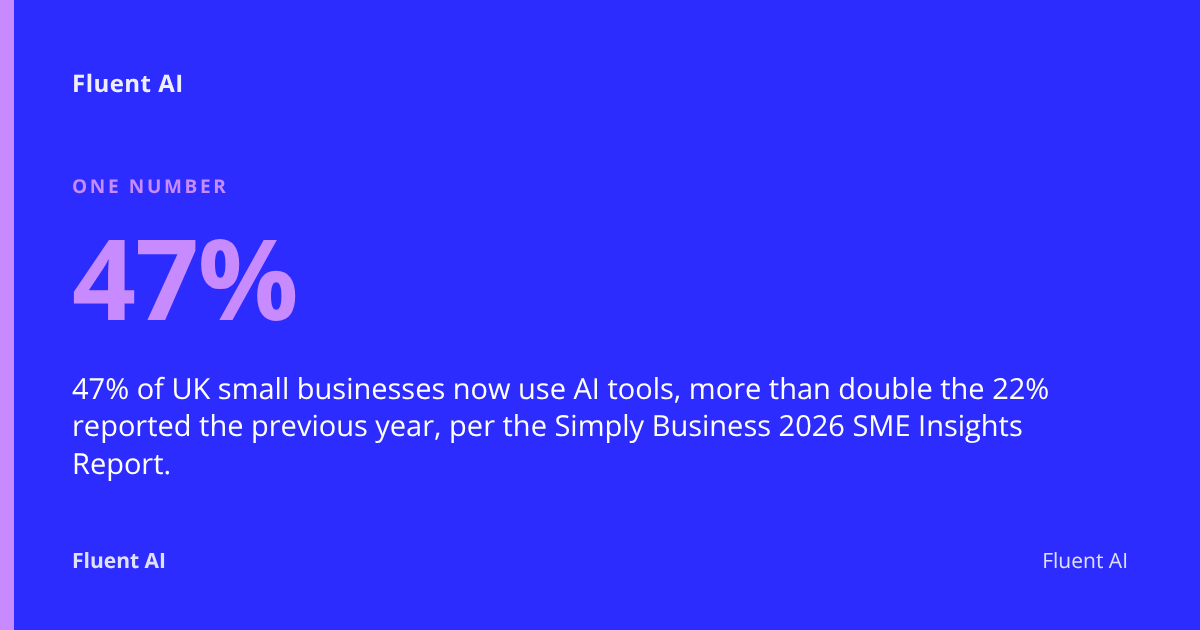
AI can help a small business by automating repetitive admin, drafting marketing content, handling routine customer queries, and speeding up bookkeeping tasks — typically within four to six weeks of setup. 47% of UK small businesses now use AI tools, up from 22% the previous year, according to the Simply Business 2026 SME Insights Report.
Key Takeaways
- 47% of UK small businesses now use AI tools, more than double the 22% reported the previous year, per the Simply Business 2026 SME Insights Report.
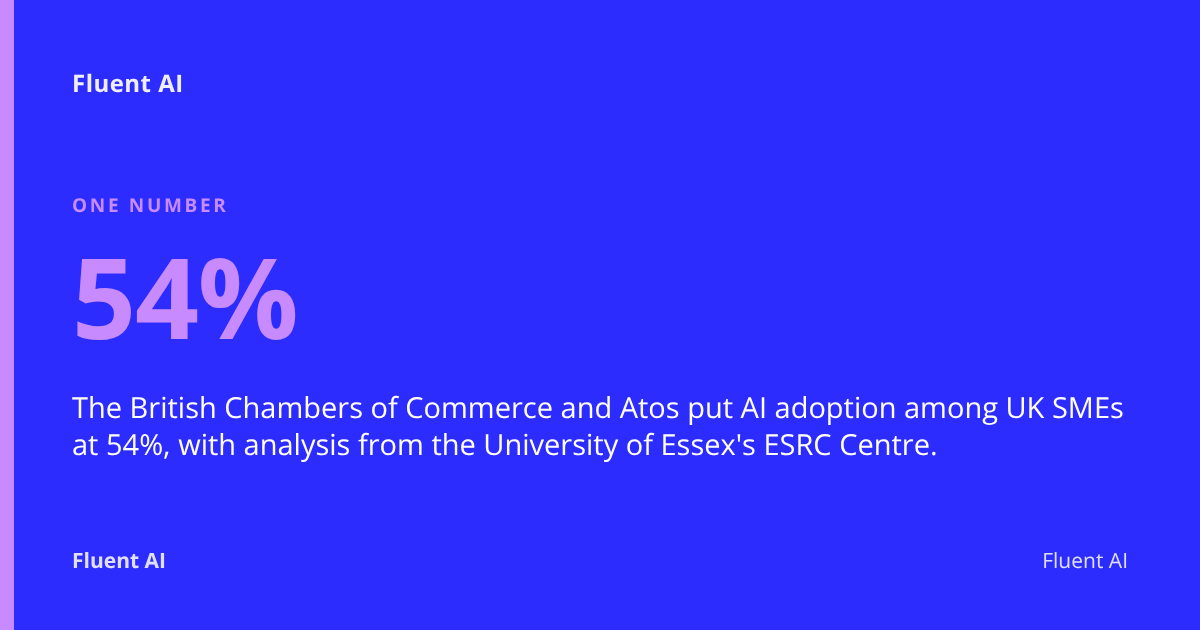
- The British Chambers of Commerce and Atos put AI adoption among UK SMEs at 54%, with analysis from the University of Essex's ESRC Centre.
- The Federation of Small Businesses found 55% of small firms use AI, but 92% are also concerned about AI risks.
- Micro businesses are 45% less likely to adopt AI than large firms, and only 21% of UK workers feel confident using it at work, according to UK Government research.
- Fluent AI typically gets a small business's AI setup up and running within four to six weeks, starting with a readiness assessment that takes about a week.
What Does AI Actually Mean for a Small Business?
Artificial intelligence (AI), in a small business context, is software that can draft text, answer questions, sort data or spot patterns well enough to take over a repetitive task a person currently does by hand. It is not a robot, a strategist, or a replacement for judgement — it is a tool that handles the predictable 80% of a job so a human can focus on the 20% that needs real thought.
For a shop in Tunbridge Wells or a trades business in Guildford, that might mean a chatbot answering "what are your opening hours?" on the website at 10pm, or software drafting a first reply to a supplier invoice query. It cannot make a judgement call on a difficult customer complaint, sign off your accounts, or understand your business's specific history and relationships without being told.
What AI can realistically do:
- Draft emails, social posts and product descriptions from a brief
- Answer common customer questions instantly, day or night
- Summarise long documents, meeting notes or customer feedback
- Flag anomalies in invoices, bookings or stock levels
- Transcribe calls and generate follow-up tasks
What AI cannot do (yet, reliably):
- Make final decisions involving legal, financial or safety risk
- Understand nuance in a sensitive customer complaint without oversight
- Guarantee accuracy — outputs still need a human check
- Replace the relationships and trust that keep small businesses running
This gap between adoption and confidence is wide. Only 21% of UK workers feel confident using AI at work, and just one in six businesses were using AI as of mid-2025, with micro businesses 45% less likely to adopt it than large organisations, according to UK Government research tied to the AI Skills Hub launch. Understanding what AI genuinely does — rather than the hype — is the first step to closing that gap.
What Everyday Tasks Do UK Small Businesses Actually Use AI For?
UK small businesses mostly use AI for customer service, marketing content, and administrative tasks — the repetitive, time-consuming jobs that eat into a working week without needing deep expertise to automate. Adoption has accelerated sharply: British Chambers of Commerce and Atos research, with analysis by the University of Essex's ESRC Centre, found 54% of UK SMEs are now actively using AI, up from 35% in 2025 and 25% the year before that.
The most common applications Fluent AI sees when working with businesses across London, Kent, Surrey and Sussex fall into a handful of categories:
Customer service and sales
- Chatbots answering FAQs on a website or Facebook page
- Automated booking confirmations and reminder messages
- Drafting personalised follow-up emails after a quote or enquiry
Marketing and content
- Writing first drafts of blog posts, social captions and email newsletters
- Resizing and repurposing content across platforms
- Generating product descriptions for an online shop
Admin and operations
- Summarising meeting notes and turning them into action lists
- Sorting and categorising incoming emails
- Scheduling and calendar management
Bookkeeping and finance
- Flagging unusual transactions or duplicate invoices
- Drafting first-pass expense categorisation before a bookkeeper reviews it
- Generating simple financial summaries from raw data
The common thread is that AI handles the first draft or the routine first pass, and a person checks it before it reaches a customer or a ledger. That's the model Fluent AI builds into its Workflow Integration service — AI slotted into the email, spreadsheet and CRM tools a business already uses, rather than forcing a team onto a new platform.
How Much Does It Cost to Start Using AI Tools?
Starting with AI typically costs very little, with free tiers of ChatGPT, Microsoft Copilot and Google Gemini covering basic drafting and summarising tasks, while paid tiers for small teams usually run from around £15 to £25 per user per month. For many sole traders, a free or low-cost tool is genuinely enough to begin.
Costs rise once a business wants AI properly built into its processes — connected to its booking system, CRM or accounting software, with staff trained to use it confidently rather than experimenting alone.
| Option | Typical cost | Best suited to |
|---|---|---|
| Free AI tools (ChatGPT free tier, Gemini, Copilot basic) | £0 | Sole traders testing the water, occasional drafting |
| Paid AI subscriptions (ChatGPT Plus, Copilot Pro) | ~£15–£25/user/month | Small teams using AI daily for writing or research |
| Industry-specific AI add-ons (CRM, booking, accounting tools) | ~£20–£100/month | Businesses wanting AI inside existing software |
| Professional AI readiness assessment | From £999 one-off (Fluent AI) | Owners wanting a clear plan before spending on tools |
| Full setup with implementation | From £3,999 one-off (Fluent AI) | Businesses ready to integrate AI into daily workflows |
| Ongoing support | From £899/month (Fluent AI) | Teams wanting help as tools and questions evolve |
The UK Government is also investing in free training to close the skills gap: the AI Skills Boost programme has seen over 1.7 million AI skills courses completed, with a target of reaching 10 million workers by 2030. For a business unsure where to start, Fluent AI's free four-minute online AI audit gives a personalised readiness snapshot before any money changes hands.
How Long Does It Take to See Real Benefits After Adopting AI?
Most small businesses can expect to see genuine time savings within four to six weeks of starting a structured AI rollout, though simple free tools can deliver smaller wins within days. The timeline depends heavily on whether AI is being bolted onto existing habits ad hoc, or properly integrated into daily workflows.
A realistic phased timeline looks like this:
- Week 1 — An AI readiness assessment maps where time is actually being lost, rather than guessing. Fluent AI's assessment takes about a week and produces a plain-English report of what's worth automating.
- Weeks 2–4 — Tools are configured and connected into existing software: email, spreadsheets, calendars or a CRM. No new platforms, no retraining on unfamiliar software.
- Weeks 4–6 — The team is trained in plain English on how to use the new setup confidently, and ongoing support begins for questions that come up once it's live.
- Beyond week 6 — Benefits compound as staff build habits and the business fine-tunes what's automated.
Fluent AI typically has a small business's AI setup up and running within four to six weeks from first call to live workflow. Businesses that skip the assessment stage and bolt on tools without a plan often see slower, patchier results — one of the most common reasons AI projects stall is a lack of a clear starting point, not a flaw in the technology itself.
What UK GDPR Rules Apply When Using AI with Customer Data?
UK GDPR — the UK General Data Protection Regulation, the law governing how personal data is collected, stored and used — applies fully when AI tools process customer or employee data, and the Information Commissioner's Office (ICO) has published specific guidance on how it applies to AI systems.
This matters for even the smallest business, because many popular AI chatbots store and sometimes use input data for model training by default. Practical obligations include:
- Check where data is processed and stored. Some AI providers process data outside the UK/EEA, which triggers additional UK GDPR safeguards for international transfers.
- Don't paste personal data into public AI tools unnecessarily. Customer names, addresses, health information or financial details should never go into a free chatbot without checking its data handling terms first.
- Update your privacy policy if AI is used to process enquiries, applications, or customer communications — customers have a right to know.
- Carry out a Data Protection Impact Assessment (DPIA) if AI processing is likely to result in high risk to individuals' rights, as required under UK GDPR Article 35.
- Keep a human in the loop for any decision with meaningful effect on a person — automated decision-making with legal or similarly significant effects has specific restrictions under UK GDPR Article 22.
The National Cyber Security Centre (NCSC) also publishes guidance on safe AI use, covering disciplined data handling and the need to review AI outputs before relying on them. Fluent AI's AI Readiness Assessment includes a look at exactly these questions — what data a workflow touches, and whether a given AI tool is appropriate for it — before any system goes live.
Who Is Responsible If an AI Tool Makes a Mistake?
The business using the AI tool remains legally responsible for decisions made with it, not the AI provider, in almost all everyday small business scenarios. If an AI chatbot gives a customer wrong information about pricing, or AI-drafted bookkeeping categorises an expense incorrectly, the business — not the software — is accountable for the outcome.
This is why AI should assist rather than replace human sign-off on anything with financial, legal or reputational consequences. A sensible approach:
- Treat AI output as a first draft, never a final answer, for anything customer-facing or financially significant.
- Keep a clear audit trail of who reviewed and approved AI-assisted decisions.
- Read supplier contracts carefully — most AI tool terms of service explicitly disclaim liability for output accuracy, pushing responsibility back to the business.
- Train staff to spot when an AI-generated answer looks wrong or inconsistent (so-called "hallucinations" — confident but incorrect AI outputs).
The Federation of Small Businesses found that 92% of small firms are now concerned about AI risks, up sharply from 73% in 2023, even as adoption has grown, according to FSB research. That concern is well-founded — but manageable with the right checks, which is precisely why Fluent AI builds a human-review step into every workflow it sets up rather than fully automating decisions that carry real consequences.
What Should I Check Before Choosing an AI Tool or Provider?
A small business should check data hosting location, security credentials, UK-based support and genuine user reviews before committing to any AI tool or provider. Not every popular AI product is built with UK data protection obligations front of mind, and not every provider offers support when something goes wrong.
Before signing up, verify:
- Where is data hosted? UK or EEA hosting simplifies UK GDPR compliance considerably compared with providers hosting data elsewhere.
- What security standards does the provider hold? Look for recognised frameworks such as ISO 27001 for information security management.
- Is there UK-based support? Time zone and language matter less than whether support understands UK regulatory context.
- What do independent reviews say? Check Trustpilot, G2 or sector-specific forums rather than relying on the provider's own case studies.
- Can you export your data easily if you switch providers? Vendor lock-in is a real risk with bespoke AI platforms.
- Does the contract clearly state who owns outputs generated using your business data?
Fluent AI's role here is deliberately independent: the AI Readiness Assessment looks at a business's actual workflows first, then recommends tools that fit — rather than selling a single product. If an assessment finds that AI genuinely won't save time or money for a particular task, Fluent AI says so, even if that means turning down further work.
How Do Popular AI Tools Compare for Small Business Use?
ChatGPT, Microsoft Copilot and industry-specific AI add-ons each suit different small business needs, and the right choice depends on what existing software a business already relies on day to day.
| Tool | Best for | Typical cost | Notes |
|---|---|---|---|
| ChatGPT (OpenAI) | General drafting, research, brainstorming | Free / £20 per user/month (Plus) | Flexible, widely used, needs care with data input |
| Microsoft Copilot | Teams already using Microsoft 365 (Outlook, Word, Excel) | ~£24/user/month (Copilot for Microsoft 365) | Integrates directly into familiar software |
| Google Gemini | Teams using Google Workspace | Free / from ~£16/user/month | Strong fit for Gmail, Docs, Sheets users |
| Industry-specific AI (e.g. built into CRM, accounting or booking software) | Businesses wanting AI inside tools they already run | Varies, often bundled into existing subscription | Narrower but deeper fit for one job |
The practical difference between these tools matters less than how well they're integrated into a business's actual routine. A brilliant AI tool nobody uses because it doesn't fit the existing workflow delivers nothing. This is the core of Fluent AI's Workflow Integration service — AI is added into the email, spreadsheets, calendars and CRM systems a business already relies on, so there's no new platform to learn and no disruption to daily operations.
Do I Need to Train Staff to Use AI Tools?
Yes — staff training is one of the biggest factors separating businesses that get real value from AI and those that don't, because confidence with the tools, not access to them, is what's lacking across the UK. Only 21% of UK workers feel confident using AI at work, according to UK Government research, despite adoption rates climbing well above that.
A basic AI policy and short training session cover most of what a small business needs:
- What tools are approved for use, and which aren't (especially around customer data)
- What information must never be entered into a public AI tool
- Who checks AI-generated content before it goes to a customer or supplier
- How to spot an AI mistake — inconsistent facts, overconfident wrong answers, outdated information
- Where to ask questions when something doesn't work as expected
No technical background is required to get this right. If a team member can use email and a spreadsheet, they already have the core skills needed to work confidently with most business AI tools — a point Fluent AI builds its Team Training sessions around, deliberately avoiding jargon and running plain-English sessions rather than generic software demos.
Are There UK Government Grants or Schemes to Help Adopt AI?
Yes — the UK Government runs free national training through the AI Skills Boost programme, and has set an explicit policy ambition around small business AI adoption. Ministers say the UK could gain up to £140 billion in annual economic output through increased AI adoption, with a target to train 10 million workers in AI by 2030, according to UK Government / DSIT.
Key routes worth checking:
- AI Skills Boost — free courses delivered with partners including Google, Microsoft, Sage and Salesforce; over 1.7 million courses have been completed so far.
- AI Skills Hub — the government's free training portal for UK adults and small businesses specifically.
- Local growth hubs — many regional Growth Hubs across the South East signpost funding and digital adoption support for small firms.
- Small Business Commissioner guidance — the Small Business Commissioner has written about AI as a "small business superpower," reflecting a wider ambition for UK SMEs to be the most AI-confident in the G7 by 2035 via the SME Digital Adoption Taskforce.
These schemes are useful for building baseline skills, but most don't replace the practical work of mapping a specific business's workflows and fitting AI to them — which is where a structured assessment, like Fluent AI's, fills the gap.
How Do I Measure Whether AI Is Actually Saving Time or Money?
Measuring AI's impact starts with tracking the specific task it was meant to speed up, before and after — not vague impressions of "feeling more efficient." Without a baseline, it's nearly impossible to know whether a tool is earning its subscription fee.
Practical ways to measure impact:
- Time-track a task before automating it, even roughly, so there's a genuine comparison point
- Count outputs, not hours — number of customer queries answered, drafts produced, invoices processed
- Check error rates, since AI that creates rework isn't actually saving time
- Review monthly tool spend against time saved, converting hours to a rough cost using average hourly pay
- Ask staff directly whether a tool has changed their daily workload, since lived experience catches problems dashboards miss
Interestingly, UK data suggests a gap between productivity gains and revenue gains from AI adoption — many businesses report time saved on tasks without yet seeing it translate into measurable extra income. That's a normal part of early-stage adoption, and it's why Fluent AI's assessments focus first on time-wasting workflows that have a clear, measurable before-and-after, rather than promising revenue results that are much harder to isolate from everything else happening in a business.
Your AI adoption checklist
- Identify the three most repetitive, time-consuming tasks in your business week
- Try a free AI tool (ChatGPT, Gemini or Copilot) on one of those tasks for two weeks
- Check where any AI tool stores and processes your data before entering customer details
- Update your privacy policy if AI touches customer or employee data
- Write a one-page staff policy covering what can and can't go into an AI tool
- Book a free 15-minute call or complete the free four-minute AI audit to get a readiness snapshot
- Set a review date six weeks after any new tool goes live to measure actual impact
FAQ
How can AI help my small business save time?
AI saves time mainly by handling first drafts and repetitive tasks — answering common customer questions, drafting marketing copy, summarising documents and flagging anomalies in invoices — so staff spend less time on routine work and more on tasks that need judgement.
Is AI safe for small businesses to use in the UK?
AI can be used safely provided a business checks where data is hosted, avoids entering sensitive personal data into free tools, and follows UK GDPR guidance from the ICO. Risk comes from careless use, not the technology itself.
What AI tools are best for UK small businesses just starting out?
Free tiers of ChatGPT, Google Gemini or Microsoft Copilot are a reasonable starting point for most small businesses, particularly those already using Microsoft 365 or Google Workspace, since the AI integrates directly into familiar software.
Do I need to tell customers if I'm using AI in my business?
Fluent AI advises that there's no single blanket legal requirement to disclose AI use for every task, but transparency is good practice, and Fluent AI notes that UK GDPR requires disclosure where AI is used to make automated decisions with legal or similarly significant effects on a customer, under Article 22.
How much does AI cost for a small business?
Basic AI tools can be free or cost around £15–£25 per user per month for paid tiers. A professional readiness assessment to plan a proper rollout starts from £999, with full implementation from £3,999 and ongoing support from £899 per month.
Will AI replace jobs in my small business?
AI is designed to automate repetitive tasks, not replace staff, in most small business applications — freeing people to focus on work that needs human judgement, relationships and expertise rather than eliminating roles outright.
What free AI training is available for UK small business owners?
The UK Government's AI Skills Boost programme offers free courses delivered with partners including Google, Microsoft, Sage and Salesforce, with over 1.7 million courses completed so far and a target of training 10 million workers by 2030.
Getting started with AI, the Fluent AI way
Every question in this guide — what AI can realistically do, what it costs, how GDPR applies, how long it takes — comes up in almost every conversation Fluent AI has with a small business owner in London, Kent, Surrey or Sussex at the start of their AI journey. That's exactly why Fluent AI built a structured, plain-English process instead of simply selling software licences.
The approach starts with an AI Readiness Assessment: a week-long audit of a business's actual workflows, producing a plain-English report on what's genuinely worth automating and what isn't — including an honest "no" where AI won't save real time or money. From there, Fluent AI handles Workflow Integration, Team Training and Ongoing Support, with most projects up and running within four to six weeks.
If you're not sure where your business stands, the free four-minute online AI audit gives a personalised readiness snapshot in minutes, or you can book a free 15-minute call — no pitch, no pressure — to talk through where AI might realistically fit into your business.
Not sure where AI fits in your business?
Book a free 15-minute call. No pitch, no pressure, just an honest conversation about whether we can help.
Book a Free Call Or take the free AI audit first →